 Tabovela

Daily to-do lists are good for tasks. But what about the things that matter this week — the report to ship, the three workouts, the chapters to read? A weekly goals tracker keeps them in sight.
Why three
People rarely achieve ten goals in a week. Three forces you to choose. If everything is a priority, nothing is. Three goals fit in your head, and you can see them every time you open a tab.
How to write a good weekly goal
- Make it concrete: “Ship the onboarding redesign” beats “work on onboarding”.
- Make it finishable: something you can tick off by Friday.
- Mix areas: one for work, one for health, one for learning is a classic split.
Keep them where you will see them
A goal in a notebook you do not open is forgotten. In Tabovela the three goals sit at the top of your new tab, with a progress bar for the week, so they are in front of you all week.
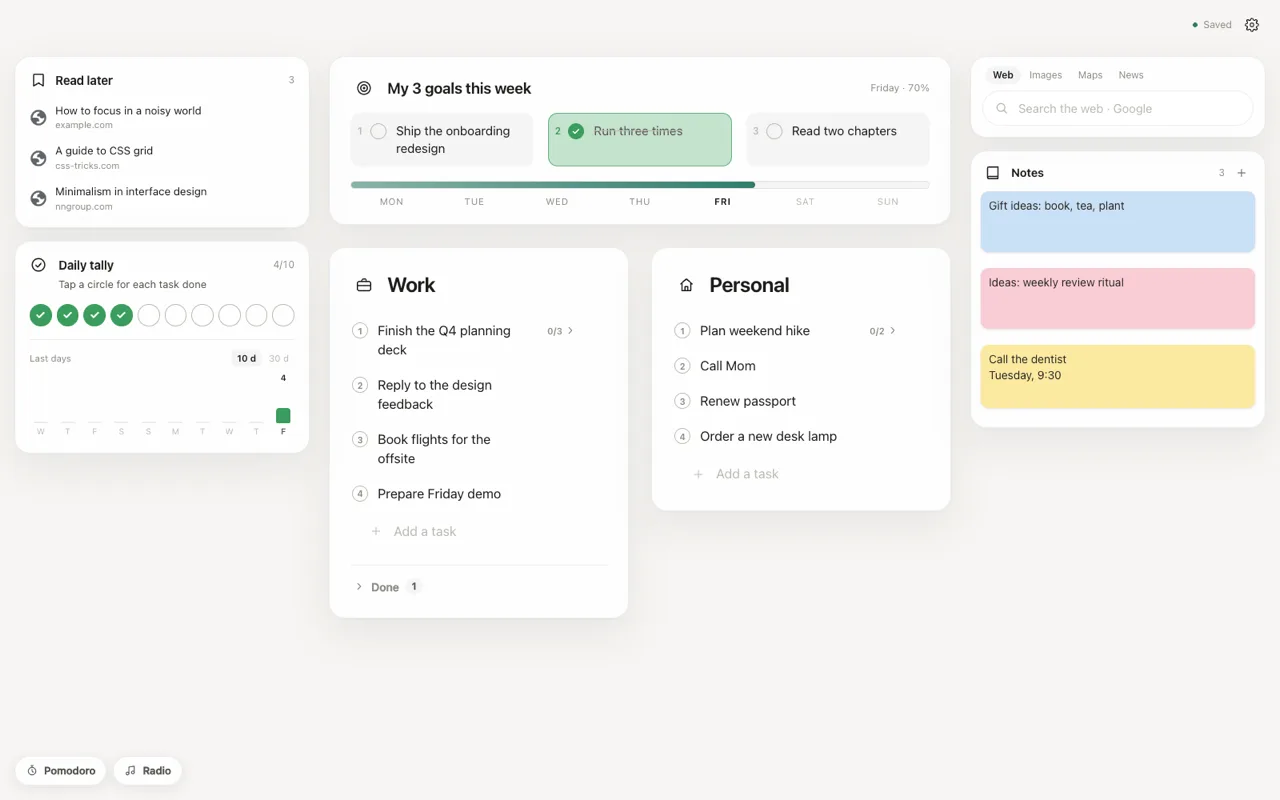
A five-minute weekly review
- On Monday morning, write your three goals.
- Each day, pick tasks from your list that move a goal forward.
- On Friday, tick what is done and note what to carry over.
Tick a goal when it is truly done, and let the week’s progress bar show the story. Pair it with a to-do list with subtasks for the daily steps.
Tabovela: a little space to get things done.
Add to Chrome — it’s freeKeep reading

Best Pomodoro timer Chrome extensions: 6 options compared
Marinara, Focus To-Do, Tomato Clock, Pomofocus, Focus Tomato and Tabovela compared: simple timers, timers with tasks, and a free timer in your new tab.

How to set up a minimalist new tab page in Chrome (in 2 minutes)
Chrome’s default new tab page is noisy. Here is how to replace it with a calm, minimalist one that shows only your next task — and how to keep it that way.