 Tabovela

The wallpaper on your new tab shapes your mood dozens of times a day. A good one calms you; a bad one competes with your text.
Pick by feeling, not by wow
- Nature scenes (mist, water, forest) relax most people.
- Space feels vast and quiet, great for deep work.
- Rain and cozy rooms suit evening planning.
Protect readability
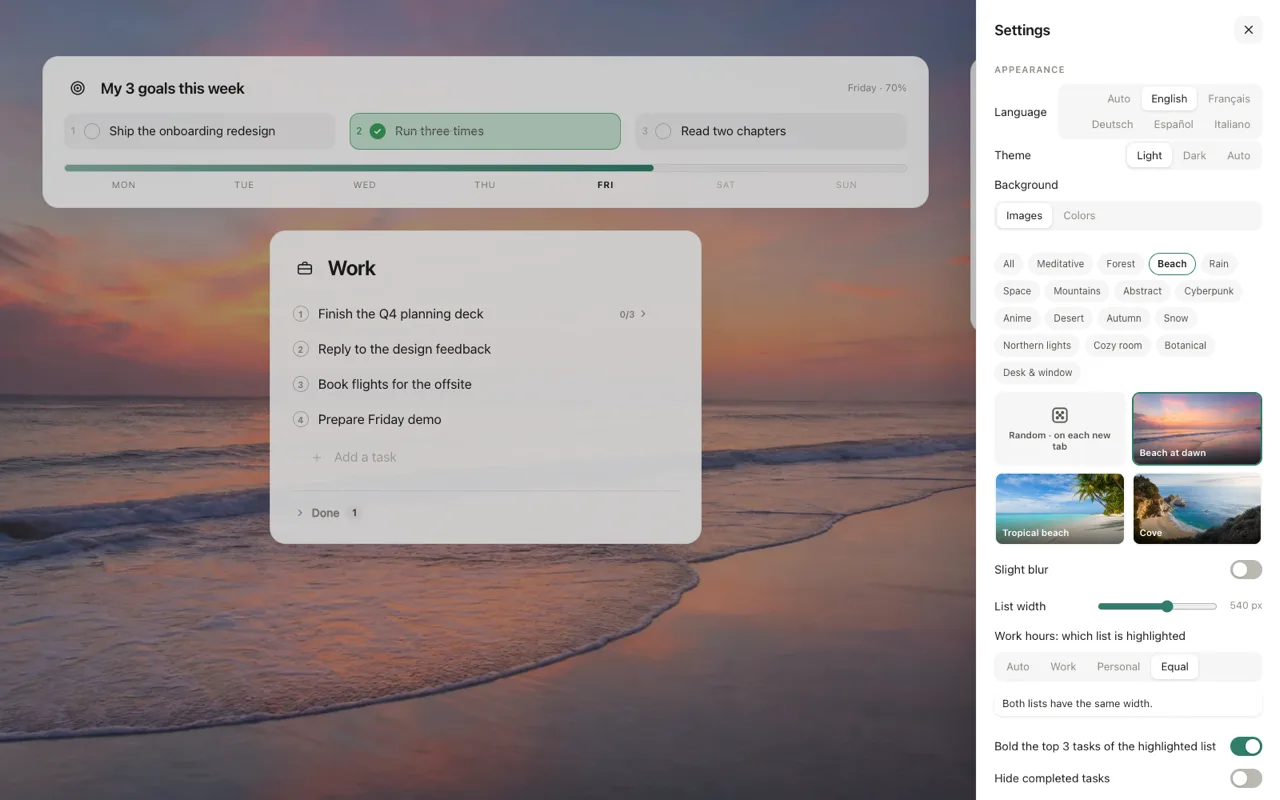
Your tasks sit on top of the image, so avoid busy detail behind them. Choose images with calm areas, then add a little dimming. Tabovela lets you dim the picture and apply a light blur, so text stays easy to read on any wallpaper.
24 wallpapers in 16 themes
Tabovela includes space, beach, forest, rain, mountains, a zen garden, northern lights, autumn, snow, a desk with a window and more. They are included in the extension, so they load instantly and work offline. They were generated with AI image models.
Prefer plain?
Choose a solid color or a soft gradient. Minimalists often do, and it is the lightest option for your computer.
Change it with the season
A new wallpaper every month is a cheap way to make the same tool feel fresh. Learn more in how to set up a minimalist new tab.
Tabovela: a little space to get things done.
Add to Chrome — it’s freeKeep reading

Best Pomodoro timer Chrome extensions: 6 options compared
Marinara, Focus To-Do, Tomato Clock, Pomofocus, Focus Tomato and Tabovela compared: simple timers, timers with tasks, and a free timer in your new tab.

How to set up a minimalist new tab page in Chrome (in 2 minutes)
Chrome’s default new tab page is noisy. Here is how to replace it with a calm, minimalist one that shows only your next task — and how to keep it that way.